Momento.
A local Windows game recorder with a built-in clip editor. Upload only the clips you choose.
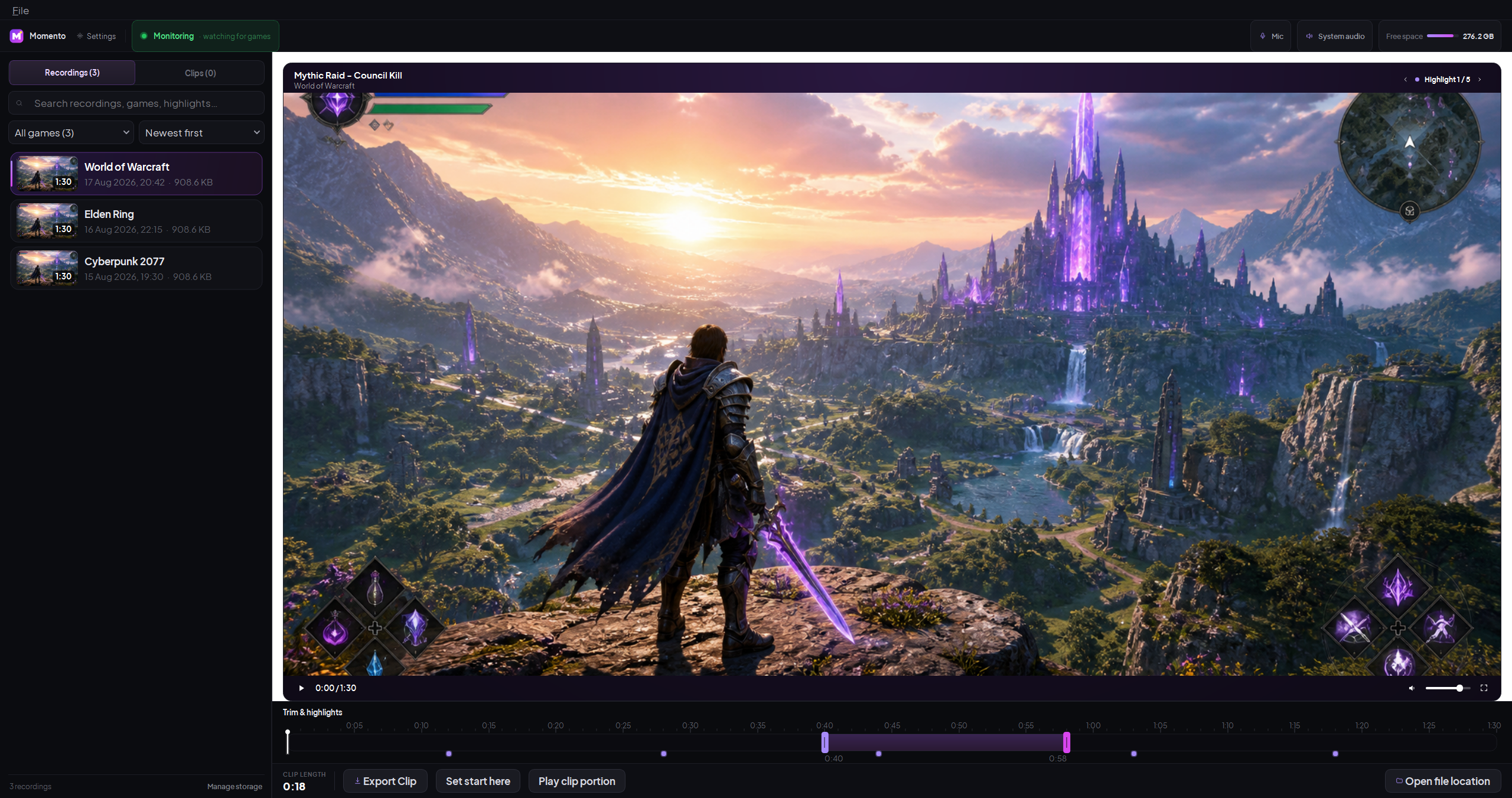
The real Momento interface, shown with sample media.
What it does
Momento sits quietly in your system tray. When it detects a game launching, it starts capturing the game's window via Windows Graphics Capture along with your microphone and the system's audio output. When the game closes, recording stops automatically and the resulting MKV file lands in your chosen folder.
The built-in editor lets you browse past recordings, trim clips, drop bookmarks during gameplay with a hotkey, and export final cuts as MP4. First-run setup helps you choose audio devices and a recording folder, then applies sensible defaults for frame rate and quality.
Features
Auto-record on game launch
Uses a configurable games list. Add executable names and toggle individual games on or off.
In-app clip editor
Timeline with trim handles, zoom, bookmark ticks, time inputs. Preview playback before export.
Bookmark hotkey
Press F8 mid-game to drop a marker. Find the highlight instantly when editing afterwards.
Crash-tolerant MKV
MKV recording improves recovery after an interruption. A repair tool handles files with enough surviving container data.
Quality presets
Low, Medium, High, or a custom bitrate. Compatible hardware encoding reduces CPU use, with a software fallback available.
Local by default
Recordings and clips stay on your PC unless you select one for YouTube upload. Momento has no cloud library or background upload.
How Momento handles your data
Local-first by design
- No telemetry. No analytics. No usage tracking.
- No account required to use Momento.
- Recordings are stored only on your machine, in a folder you choose.
- The installed build checks GitHub Releases once at startup and installs a verified stable update when Momento is idle. Manual checks offer Install now or Later. GitHub receives the source IP and
Momento-Updater/1User-Agent.
Optional YouTube upload with your Google project.
The public build includes upload controls but no Google OAuth identity. Import a Desktop OAuth JSON from a project you control, then connect through Google's browser flow. Momento encrypts the imported client and account token with Windows DPAPI. Read the setup guide or the privacy policy.
System requirements
Windows 10 (1903 or newer) or Windows 11.
A hardware H.264 encoder is recommended. Momento checks NVIDIA NVENC, AMD AMF, Intel QuickSync, and Media Foundation against the requested recording profile. If none can open, it falls back to CPU encoding and displays a warning.
Keep at least 10 GB free for the app and a recording buffer. The default 16 Mbit/s capture setting uses roughly 7.2 GB per hour plus audio and container overhead.